NASA Eyes
Responsive redesign for NASA's public 3D space simulation tool
web
product
data viz
prototyping
prototyping
design system
NASA's Eyes on the Solar System is a free, web-based 3D visualization tool that provides an interactive simulation of our solar system. The application allows users to explore planets, moons, asteroids, comets, and NASA spacecraft in real-time, with scientifically accurate data and imagery. Developed by NASA's Jet Propulsion Laboratory (JPL), it combines real mission data with interactive simulations to make space accessible to the public.
My Role
NASA's Visualization Technology & Development team brought me on as a UX Designer to make related content, events, tools, and options easier to access on mobile. I earned their trust quickly and pitched a redesign of the primary interface to work on smaller screens and support new features, including a planned follow option for the camera view.
My Role
NASA's Visualization Technology & Development team brought me on as a UX Designer to make related content, events, tools, and options easier to access on mobile. I earned their trust quickly and pitched a redesign of the primary interface to work on smaller screens and support new features, including a planned follow option for the camera view.
My Role
NASA's Visualization Technology & Development team brought me on as a UX Designer to make related content, events, tools, and options easier to access on mobile. I earned their trust quickly and pitched a redesign of the primary interface to work on smaller screens and support new features, including a planned follow option for the camera view.
My Role
NASA's Visualization Technology & Development team brought me on as a UX Designer to make related content, events, tools, and options easier to access on mobile. I earned their trust quickly and pitched a redesign of the primary interface to work on smaller screens and support new features, including a planned follow option for the camera view.
My Role
NASA's Visualization Technology & Development team brought me on as a UX Designer to make related content, events, tools, and options easier to access on mobile. I earned their trust quickly and pitched a redesign of the primary interface to work on smaller screens and support new features, including a planned follow option for the camera view.
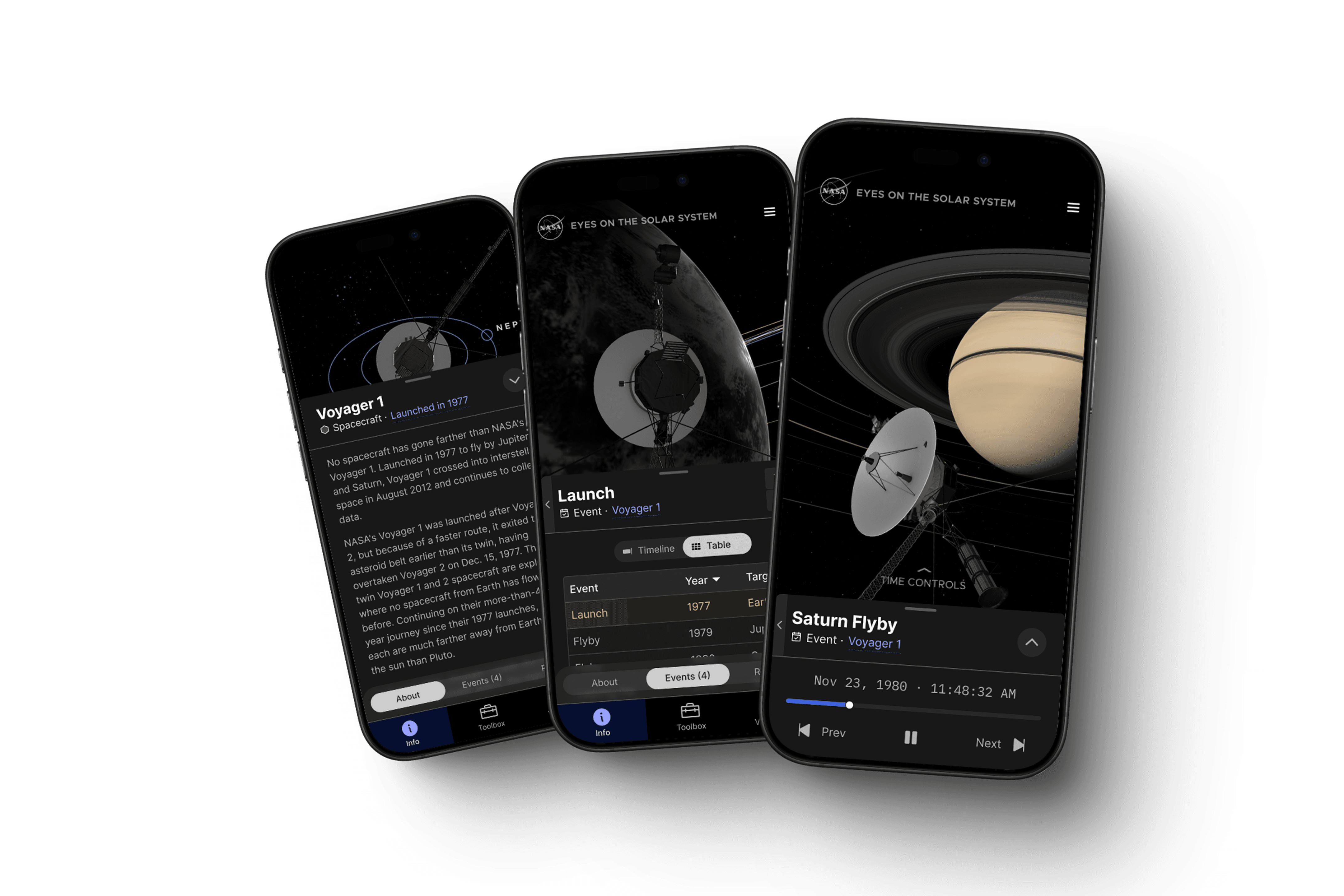
Featured interactive story for Voyager 1&2 spacecraft
Featured interactive story for Voyager 1&2 spacecraft
Featured interactive story for Voyager 1&2 spacecraft
Featured interactive story for Voyager 1&2 spacecraft
Featured interactive story for Voyager 1&2 spacecraft
Information Architecture
After reviewing product documentation, I audited the existing interface to understand the metadata for each entity type. This revealed inconsistencies in the app's information architecture. Then I identified opportunities to simplify the interface by organizing and consolidating content.
Information Architecture
After reviewing product documentation, I audited the existing interface to understand the metadata for each entity type. This revealed inconsistencies in the app's information architecture. Then I identified opportunities to simplify the interface by organizing and consolidating content.
Information Architecture
After reviewing product documentation, I audited the existing interface to understand the metadata for each entity type. This revealed inconsistencies in the app's information architecture. Then I identified opportunities to simplify the interface by organizing and consolidating content.
Information Architecture
After reviewing product documentation, I audited the existing interface to understand the metadata for each entity type. This revealed inconsistencies in the app's information architecture. Then I identified opportunities to simplify the interface by organizing and consolidating content.
Information Architecture
After reviewing product documentation, I audited the existing interface to understand the metadata for each entity type. This revealed inconsistencies in the app's information architecture. Then I identified opportunities to simplify the interface by organizing and consolidating content.
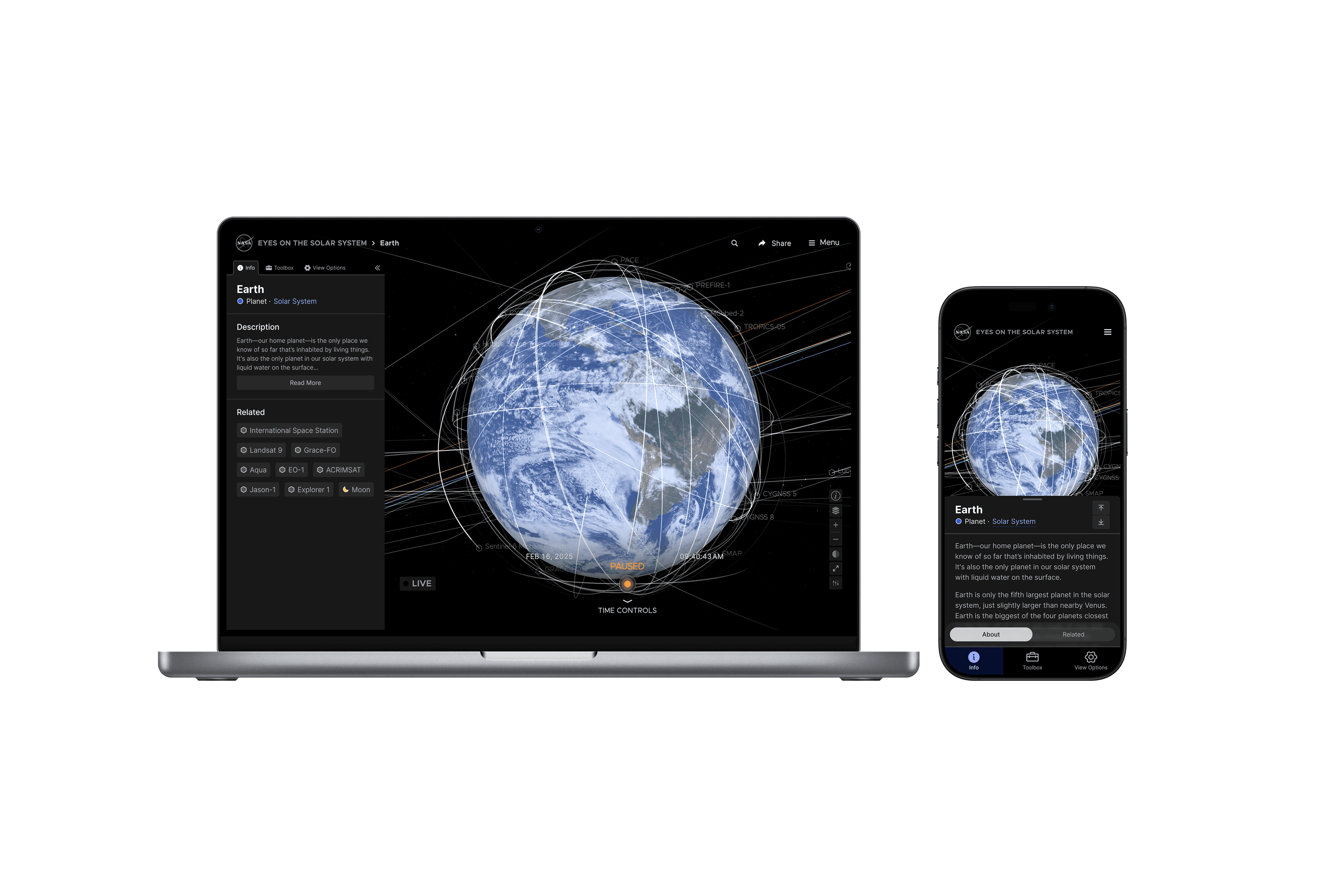
A responsive side panel allows users to easily navigate related information, jump to key moments in the mission timeline, and access tools & settings all from one place.
A responsive side panel allows users to easily navigate related information, jump to key moments in the mission timeline, and access tools & settings all from one place.
A responsive side panel allows users to easily navigate related information, jump to key moments in the mission timeline, and access tools & settings all from one place.
A responsive side panel allows users to easily navigate related information, jump to key moments in the mission timeline, and access tools & settings all from one place.
A responsive side panel allows users to easily navigate related information, jump to key moments in the mission timeline, and access tools & settings all from one place.
Design System
I used Radix UI, an open-source component library optimized for fast development, easy maintenance, and accessibility. Theming ready-made Radix components allowed me to deliver more value on a tight timeline while also freeing up bottlenecks in the team’s development process.
Design System
I used Radix UI, an open-source component library optimized for fast development, easy maintenance, and accessibility. Theming ready-made Radix components allowed me to deliver more value on a tight timeline while also freeing up bottlenecks in the team’s development process.
Design System
I used Radix UI, an open-source component library optimized for fast development, easy maintenance, and accessibility. Theming ready-made Radix components allowed me to deliver more value on a tight timeline while also freeing up bottlenecks in the team’s development process.
Design System
I used Radix UI, an open-source component library optimized for fast development, easy maintenance, and accessibility. Theming ready-made Radix components allowed me to deliver more value on a tight timeline while also freeing up bottlenecks in the team’s development process.
Design System
I used Radix UI, an open-source component library optimized for fast development, easy maintenance, and accessibility. Theming ready-made Radix components allowed me to deliver more value on a tight timeline while also freeing up bottlenecks in the team’s development process.
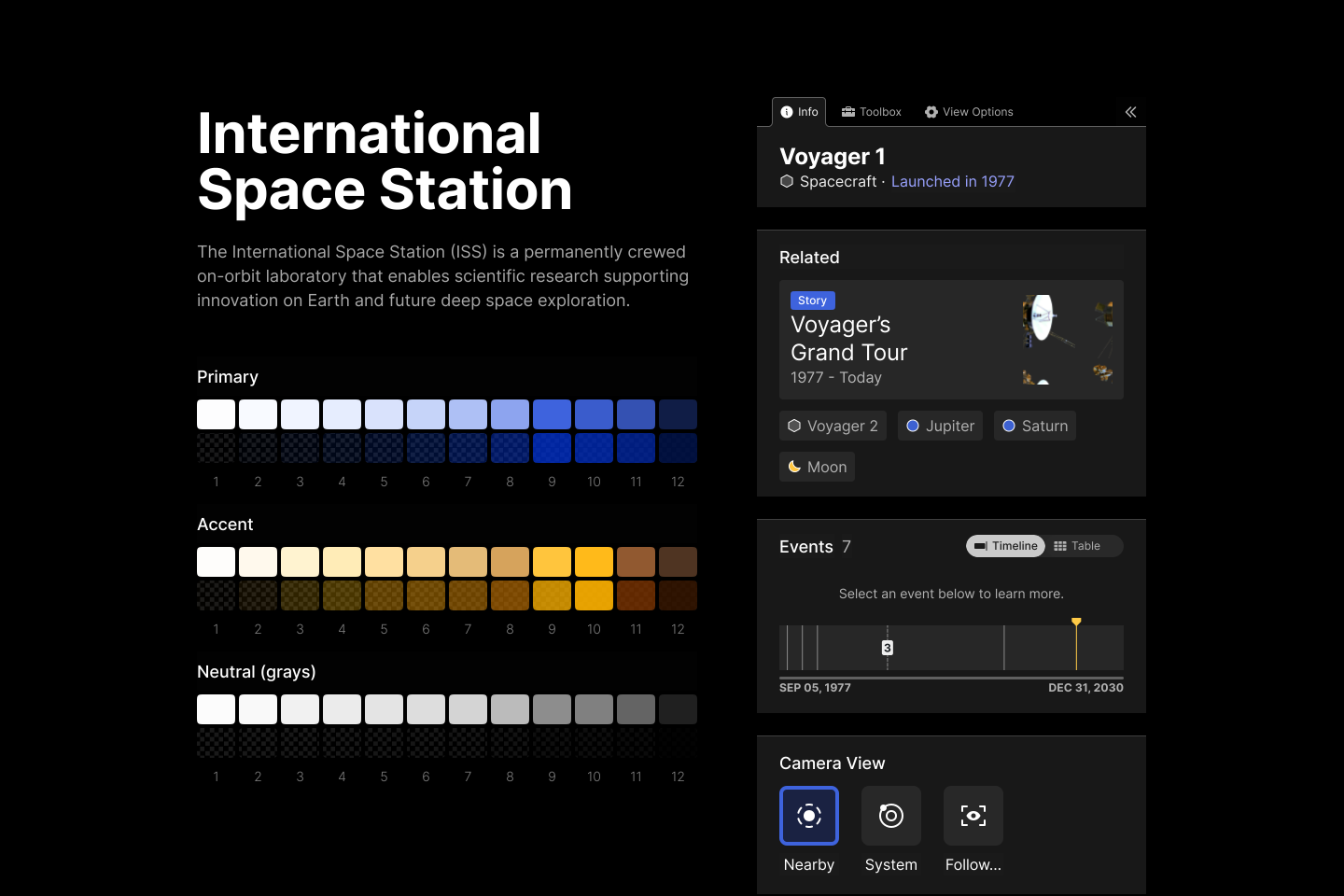
Selection of Figma components created with Radix UI
Selection of Figma components created with Radix UI
Selection of Figma components created with Radix UI
Selection of Figma components created with Radix UI
Selection of Figma components created with Radix UI
Credits
User Experience Design
Christian Gimber
Project Manager
Jason Craig
Development Team
Charles Mattei, Stephen O'Rourley, Ximena Jaramillo, Jack Simpson
Credits
User Experience Design
Christian Gimber
Project Manager
Jason Craig
Development Team
Charles Mattei, Stephen O'Rourley, Ximena Jaramillo, Jack Simpson
Credits
User Experience Design
Christian Gimber
Project Manager
Jason Craig
Development Team
Charles Mattei, Stephen O'Rourley, Ximena Jaramillo, Jack Simpson
Credits
User Experience Design
Christian Gimber
Project Manager
Jason Craig
Development Team
Charles Mattei, Stephen O'Rourley, Ximena Jaramillo, Jack Simpson
Credits
User Experience Design
Christian Gimber
Project Manager
Jason Craig
Development Team
Charles Mattei, Stephen O'Rourley, Ximena Jaramillo, Jack Simpson